How Phone Cameras Use AI (Grades 6-8 Lesson)

On a Wednesday morning in February, a 7th-grade class photographs the same moon from the courtyard using two different phones. The photos come back inside. Every student can see the moon is the same grey disc in the sky — but one phone shows a crisp sphere with surface craters and ridges, and the other shows a softer, less dramatic image. A student raises the obvious question: which one is real?
That question is harder than it sounds, and that difficulty is not anyone’s failure. It is what happens when a device makes editorial decisions about what a photo looks like — silently, between the tap and the preview — and no one gave the class the vocabulary to see what just happened. Understanding the seven-stage computational-photography pipeline behind that moon shot turns a confusing moment into a 45-minute lesson. That is what this post gives you.
TL;DR: Modern smartphone cameras use AI to decide what a photo looks like, not just to record what a sensor captured. Before you tap the shutter, the camera reads the scene. Then it shoots a burst of 6–15 frames instead of one, aligns those frames to correct for handshake, merges them to reduce noise, and finally runs a machine learning segmentation pass that processes the merged image region by region — sky, skin, detail, edges — before writing a single JPEG. The result can look sharper and better-lit than what the eye saw. In some cases, like the Samsung moon, the phone may add texture detail that was not optically present in the source.
How do phone cameras use AI to make a photo?

Understanding how phone cameras use AI starts with one clarifying fact: the image you see is not the exposure your sensor measured. It is a reconstruction built from multiple frames and multiple model decisions.
Stage 1 — Pre-capture scene analysis. Before you tap, the camera’s neural engine is already reading the scene. Samsung’s Scene Optimizer identifies subject types — food, sky, plants, or in the case we will examine, the moon as a specific recognized object — and adjusts the capture pipeline accordingly. The phone is already making decisions before the shutter fires.
Stage 2 — Burst / multi-frame capture. The phone does not take one photo. It takes many, almost simultaneously. Google Night Sight (launched November 14, 2018) captures 6–15 raw frames per shot. Apple Deep Fusion (iPhone 11, September 2019) captures nine: four short frames before the shutter taps, four short frames after, and one long frame. Google HDR+ uses 2–8 frames. No single exposure makes the final image.
Stage 3 — Align and register frames. Between capture and merge, the phone corrects for handshake. Google’s Night Sight pipeline aligns all frames to a reference frame before any pixel values are combined, so motion blur from a slightly-moved hand does not compound across the stack.
Stage 4 — Merge and stack. Aligned frames are combined at the raw sensor level. HDR+ merging averages consistent signal across frames while rejecting outlier pixels — a dust particle or a sudden motion shows up in one frame but not in others, so the algorithm discards it. Stacking multiple exposures is how Night Sight brightens dark scenes without adding the grain a single long exposure would produce.
Stage 5 — ML segmentation and editorial decision. Here the camera stops recording and starts making decisions. The neural engine processes the merged image pixel by pixel in content-specific passes: sky regions receive one set of adjustments, skin tones another, edge detail a third. This is the stage where computational photography becomes genuinely editorial — the phone is choosing how each type of region should look based on what it learned from training data, not from what your sensor measured.
Stage 6 — Tone, color, and detail enhancement. Learned white-balance models correct color temperature. Noise reduction models smooth regions the ML pass flagged as uniform. Sharpening models add apparent edge contrast in high-detail areas. Portrait mode runs an additional ML depth-segmentation pass that separates the subject from the background, then applies a graduated blur — the bokeh — using a model that learned what “shallow depth of field” looks like in photography, not from actual lens optics. DXOMark’s bokeh test methodology describes the segmentation artefacts this process introduces at hair edges and glasses frames.
Stage 7 — Output. The phone writes one JPEG. The user sees one photo. The phone made dozens of decisions about which pixels represent “reality.”
The anchor phrase for any classroom introduction: your phone is not recording a moment — it is reconstructing one.
The Samsung moon photo: does your camera add detail that was never there?
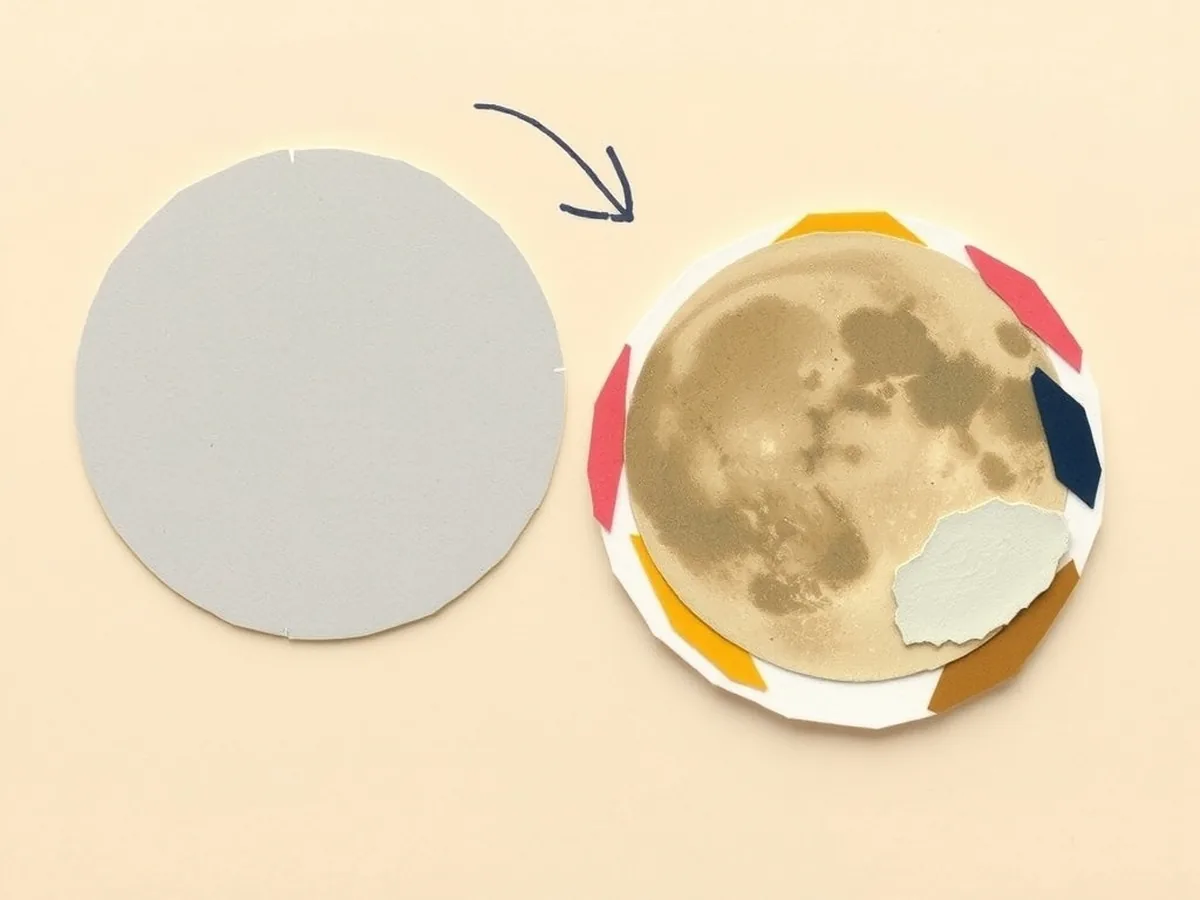
In March 2023, a Reddit user with the handle u/ibreakphotos ran a precise experiment. They took a real photo of the moon and blurred it in post-processing until every surface feature — every crater, every ridge, every tonal variation — was gone. What remained was a uniform grey disc. They displayed that grey disc on a monitor and photographed it with a Samsung Galaxy S23 Ultra. The phone’s resulting photo showed craters and surface texture that were not present in the blurred source image. The experiment was documented on Reddit and subsequently reported by PetaPixel.
Samsung’s official response acknowledged that Scene Optimizer recognizes the moon as a specific object during the photo-taking process and applies “a deep-learning-based AI detail enhancement engine.” Samsung stated it does not apply “image overlaying” — meaning it does not paste a stock moon photograph on top of your shot. Critics found that framing evasive: if the model synthesizes detail from a learned template of “what the moon looks like,” the practical result is a photo that shows surface features that were not optically captured. Whether you call that enhancement or synthesis, the craters were not in the source signal.
The conceptual line this moment draws in a classroom: confidence in a photo is not the same as capture. The phone matched the grey disc to the object class “moon,” and then it consulted a trained model of moon surface detail — and applied that model’s knowledge to a blurred source. The grey disc was real. The craters in the final photo came from the model. Users who prefer unprocessed output can disable Scene Optimizer in Samsung camera settings, though the option is not prominently surfaced.
A photo can look authoritative and still contain information the camera did not optically receive. That sentence is the thread that pulls all the computational-photography concepts together.
Where phone camera AI fails: portrait edges, Best Take, and beautification
When any machine learning system encounters conditions at the edge of its training data, the failure becomes visible. Phone camera AI is no different.
Portrait-mode edge errors. The ML depth-segmentation model that separates subject from background struggles with fine hair strands, transparent fabric, and eyeglasses frames. DXOMark’s evaluation of computational bokeh documents halo artefacts around hair and the way translucent materials confuse the depth-segmentation pass. These failures are not glitches — they reveal the boundary of the training data. The model learned “foreground versus background” from labeled examples, and fine, complex edges are where that learning runs out.
Google Best Take (Pixel 8, released October 12, 2023). This feature composites facial expressions from different frames in a burst into a single image. If one person blinks in the best overall frame, the phone substitutes their face from a different frame where they did not. The Washington Post covered the feature on release, and the reception was mixed — the substituted expressions hover near the uncanny valley, and the feature raises a clear question for any media-literacy class: a photo produced by Best Take can show expressions that never existed simultaneously in a single moment. The image is technically made from real faces. The moment it depicts did not happen.
Auto-beautification and skin smoothing. Many front-facing cameras apply skin smoothing by default. Beauty filters, as described in Forbes’ analysis of AI beauty standards, tend to encode specific appearance norms — smoother skin, narrowed noses, lighter tones — because those features were overrepresented in training data. The Children’s Society has noted the link between repeated exposure to filtered appearances and adolescent body image. For a middle-school class, this is not a technology discussion — it is a media-literacy and equity discussion. The phone encoded a trained idea of what a “good” face looks like. Students are looking at that idea every time they use the front camera.
This is where the literacy gap matters most. Teachers are not expected to know the history of JPEG compression or ML depth segmentation. What is missing is not technical expertise — it is a framework for reading a photo as a machine output rather than a window onto the world. That framework is closable in 45 minutes, and the students who most need it are already carrying the devices.
A 45-minute no-device lesson: “Be the Camera Pipeline”
Students role-play each stage of the computational-photography pipeline using teacher-provided printed images. No student phones are used during the activity — all source images are teacher-selected and printed in advance, keeping the lesson FERPA-safe (no student faces, no student-generated content enters the classroom record).
What you need: one set of 8–10 printed “burst frame” cards per group (the same scene printed with slight variations in brightness and slight simulated handshake blur — you can create these in any image editor); one “merge worksheet” per group (two columns: “keep this pixel” / “reject this pixel,” with sample pixel values from two frames); one grey circle card per group (the “moon” — a plain grey disc, printed) and one reference moon photo card (a real high-detail moon image printed separately, labeled “what the model learned”); one exit-ticket half-sheet per student.
0–5 min — Hook. Tell the class the two-phones-in-the-courtyard story: same moon, same moment, two different results. Or use the u/ibreakphotos experiment directly: a grey disc goes in, craters come out. Ask the class to predict where the craters came from. Write three predictions on the board. Do not correct them yet.
5–15 min — Burst capture and align round. Each group receives five “burst frame” cards. Their job: rank the frames from sharpest to most blurred, and mark on each card what looks different (brightness, sharpness, slight shift in composition). This is Stage 2 and 3 — they are doing the capture-and-align pass by hand. A typical group finishes the ranking in about six minutes and has time for a quick share.
15–30 min — Merge and ML-decision round. Groups receive the merge worksheet. They choose one “winning” pixel value for each sample cell — they are doing Stage 4 (merge) and Stage 5 (editorial decision). The prompt: “If one frame shows this spot as bright and three show it as dim, what do you write?” After completing the worksheet, each group decides: did the merged image get “better” than any single frame? What did they have to decide — what counts as better?
30–40 min — The “synthesize the moon” round. Give every group the grey disc card and the reference moon card, face down until instructed. They have received a “blurred moon signal.” They now play the role of the AI detail-enhancement model. They can look at the reference card — the model’s training data — and add any features they believe belong on the moon’s surface to their grey disc card using a pencil. When every group has finished, flip the instruction: “You just did what Samsung’s AI did. You added detail from what you learned, not from what the source photo showed.” Debrief the line between enhancement and synthesis.
40–45 min — Debrief and exit ticket. Return to the three predictions from minute zero. Which held up? Each student writes one sentence on their exit-ticket half-sheet: “Phone cameras are good at ____ but you can’t fully trust ____ because ____.” Collect as a formative check.
Standards this lesson supports
| Standard | Code | How the lesson hits it |
|---|---|---|
| ISTE Knowledge Constructor — evaluate accuracy and credibility | ISTE 1.3.b | The moon-synthesis round and debrief directly address whether a confident-looking photo is an accurate capture |
| ISTE Knowledge Constructor — build knowledge exploring real-world issues | ISTE 1.3.d | The u/ibreakphotos experiment and Best Take discussion use real, documented examples |
| ISTE Digital Citizen — safe, legal, and ethical use of media | ISTE 1.2.b | The beautification and Best Take discussions address the ethics of sharing AI-synthesized images as photographs |
| AI4K12 Big Idea #1 — Perception | AI4K12 BI#1 | Stage 1 (pre-capture scene analysis) shows that the camera perceives the scene before any human decision |
| AI4K12 Big Idea #5 — Societal Impact | AI4K12 BI#5 | The beautification and equity discussion connects training-data bias to real impact on adolescent body image |
| CCSS collaborative discussion | CCSS.ELA-LITERACY.SL.7.1 | The confidence-vote in the merge round and the moon-synthesis debrief are structured collaborative conversations |
| CCSS gather and assess credibility of sources | CCSS.ELA-LITERACY.W.7.8 | Students evaluate a visual source (the phone’s output) against the mechanism that produced it |
Standards source: ISTE Standards. ISTE is a registered trademark of the International Society for Technology in Education. These resources are not affiliated with or endorsed by ISTE.
Where to go next
The question “are phone photos real?” does not have a yes-or-no answer — and that is exactly the right place to leave a 7th grader. When students can name the pipeline — burst, align, merge, segment, enhance — they stop reading a sharp, beautiful photo as transparent evidence and start reading it as a machine output that reflects training data, design choices, and definitions of “better” that someone else wrote. That shift is a literacy skill, not a technology skill. It takes 45 minutes to begin, and it is not something anyone was handed a curriculum to teach.
Two lessons in the same series go one step further on related mechanisms. The facial recognition lesson plan covers identity matching — the same four-step capture-extract-match-rank pipeline but applied to identifying who is in a photo, not what the photo looks like. The how AR face filters work lesson covers the overlay mesh — the phone mapping a grid to your face in real time to apply augmented-reality effects. These three topics form a natural unit: how phone cameras use AI to make a photo, how they use AI to identify who is in a photo, and how they use AI to place graphics on a face in real time. They are distinct mechanisms, and students often confuse them.
If you want the full 16-mechanism picture, the How AI Works MEGA: 16 Machine Learning + AI Concept Lessons gives you the camera pipeline alongside spam filters, navigation predictions, recommendation engines, and more — all structured for grades 6–12 with the same no-device role-play format. The Types of AI Deep-Dive Lesson positions computational photography as narrow AI — strong within a specific perceptual task, invisible in its assumptions. The Unplugged AI Activities: 10 No-Tech Lessons includes the card-sort and role-play format this lesson uses across ten additional AI mechanisms. If this is your first week building out an AI literacy unit and you want a no-cost entry point, the free Starter Pack at /free/ has the lesson framework and a printable vocabulary set to anchor the vocabulary before any of the mechanism lessons.
This post was drafted with AI assistance and human-finalized.
Quick questions
Phone photos are real in the sense that they start from sensor data, but the final image is a reconstruction. The camera shoots a burst of frames, aligns and merges them, then runs a machine learning segmentation pass that makes region-by-region decisions about tone, sharpness, and detail before writing one JPEG. The result can show more detail and better light than the eye saw. In some cases — like Samsung's moon photos — the model may add surface texture learned from training data rather than optically captured in the shot.
Smartphone cameras use AI at multiple stages: scene analysis before the shutter fires, alignment of a burst of 6-15 frames, merging those frames to cut noise, and a neural-network segmentation pass that processes sky, skin, and edge regions differently. Portrait mode runs a separate AI depth-segmentation model to separate subject from background and apply a simulated shallow-focus blur. The phone makes all of these decisions between tap and preview, invisibly.
The Samsung moon experiment (u/ibreakphotos, March 2023) showed that photographing a blurred grey disc with a Galaxy S23 Ultra produced a photo with crater detail not present in the source. Samsung confirmed its Scene Optimizer recognizes the moon and applies a deep-learning detail enhancement engine. Whether that counts as 'faking' depends on where you draw the line between enhancement and synthesis — a line worth discussing explicitly in a media-literacy class.
Get the free AI-Proof Assignment Toolkit
10 ways to redesign any assignment so an AI chatbot structurally can't do it — plus a redesign worksheet, a 45-minute lesson, the “Spot AI Work” card, and parent templates. One email, all 5 pieces.
Prefer the full breakdown? See everything inside the toolkit →